

But things are different for beginners or slow
typers. Those who are unnerved because they continually have to reach for
the reference guide, checking in which syntax an offset has to be set of
a region, will hail the advent of pulldown menues for regions in the ACKNEX
editor. They not only will never again be tempted to mis-spell a keyword
or drop a semicolon, they are also given an overview of the many possible
keywords that may be contained in a main defintion.
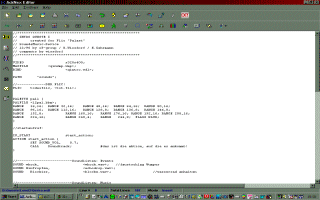 a
directory. To start the editor you only have to double-click the icon -
which you'd best put on the desktop. It's also sensible to link WDL files
to the editor and leave them on the desktop as sessions. After starting
the editor you are presented with a quite nice and well structured face.
Concerning new WDL files there are also a few nice features for professional
users: instead of writing over existing wdl files the editor offers a possibility
to install with a few mouse clicks the usual head-information: Mapfile,
resolution, color ranges etc. are set via pull down menues.
a
directory. To start the editor you only have to double-click the icon -
which you'd best put on the desktop. It's also sensible to link WDL files
to the editor and leave them on the desktop as sessions. After starting
the editor you are presented with a quite nice and well structured face.
Concerning new WDL files there are also a few nice features for professional
users: instead of writing over existing wdl files the editor offers a possibility
to install with a few mouse clicks the usual head-information: Mapfile,
resolution, color ranges etc. are set via pull down menues.
Now things are really starting to get interesting
for beginners. Most possible definitions have their own icons in the menue.
If you click on "insert bitmap", a pulldown with predefined syntax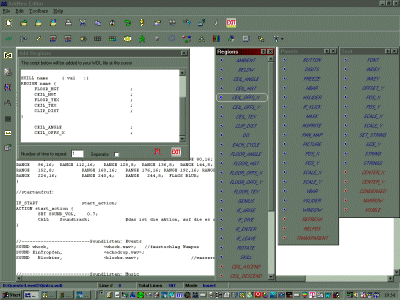 appears - including pointed brackets for the filenames and complete with
proper commas and semicolons. No way can a rookie go astray here. Clicking
OK properly transfers the settings from the editor window to the virgin
WDL file. The screenshot shows the editor with opened menue for regions,
skills and the editing window. The author very much strives to remain up-to-date,
catching all the new features of every new release. Which almost turns
the editor into a small reference book.
appears - including pointed brackets for the filenames and complete with
proper commas and semicolons. No way can a rookie go astray here. Clicking
OK properly transfers the settings from the editor window to the virgin
WDL file. The screenshot shows the editor with opened menue for regions,
skills and the editing window. The author very much strives to remain up-to-date,
catching all the new features of every new release. Which almost turns
the editor into a small reference book.
The usual features of an editor, like search/replace,
line numbers and - starting with the latest release - even syntax highlighting
are there as well. So it's quite a useful tool at a reasonable price. You
can download a demo from Greg
Reith's homepage. It contains all features but can't save files.